Use FUNEL fromyour AI assistant.
One URL connects Claude, Cursor, VS Code, and custom agents to FUNEL. Your assistant searches millions of professional profiles and companies, builds lead lists, runs enrichment, and checks exact prices, in plain conversation. Every paid action shows its price and waits for your go-ahead.
Search free. Pay per lead, not per question.
https://mcp.funel.to/mcpAsk in plain words. Get real data back.
I searched FUNEL’s professional-profile pool. About 3,400 people match (marketing leadership, software companies with 51 to 500 employees, Germany). Here are three samples:
A 50-lead list with verified work emails would cost about 400 credits. Searching and pricing are free, and nothing has been spent. Want me to build the list?
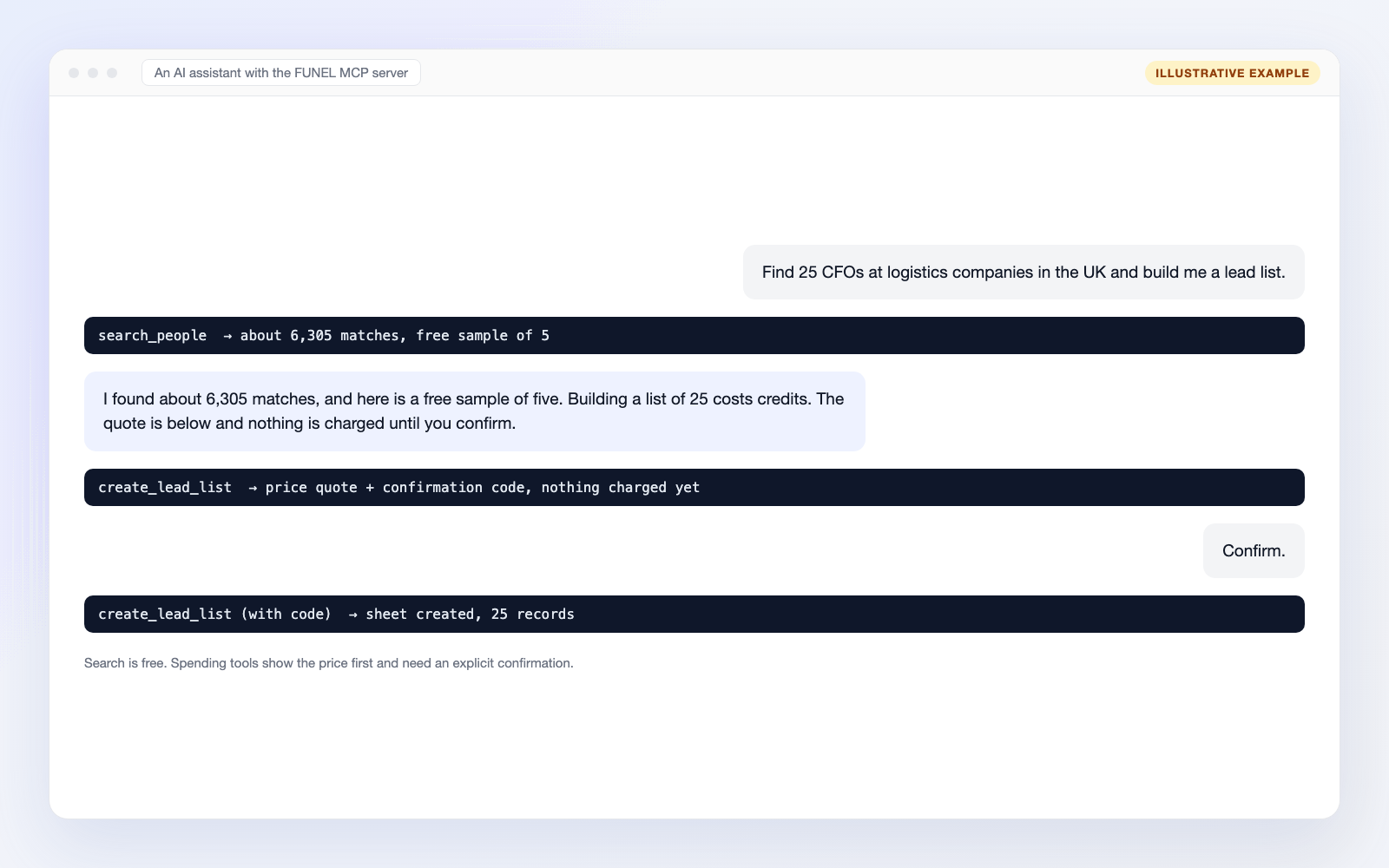
Search free. Pay per lead, not per question.
Agents ask a lot of questions. On FUNEL, questions are free.
Exploring costs nothing
Every count, sample, sheet read, and price check is free. Your assistant can refine a search twenty times before you commit to anything.
Credits only when leads land
You pay the same credit rates as in the app, and only when records land in your list. Every paid tool shows an exact quote and waits for your confirmation before a single credit moves.
Scoped and revocable
Access runs on API keys you control. Keys default to read-only scopes, spending is opt-in per key with a daily credit cap, and you can revoke a key in a click.
Not sure where to start? Copy one of these.
Paste a prompt into Claude, ChatGPT or Cursor once FUNEL is connected. Anything that costs credits shows its price first.
Look around as much as you like. Counts and samples are free.
“How many marketing directors at software companies in Germany are there, and can you show me five?”
search_peopleFree“Which logistics companies in the UK have between 50 and 200 employees?”
search_companiesFree“Find dental practices in Leeds that have a website and good ratings.”
search_local_businessesFree“What does it cost to unlock a contact, and what is a verified email on top?”
get_pricingFree
Examples to adapt. Results and prices depend on your search, and nothing is spent until you have seen the price and confirmed.
Connected in three steps.
- 1
Create a free FUNEL account
New accounts get bonus credits, no card required. Sign up
- 2
Create an API key
In the app under Integrations, API keys. Read scopes cover searching; turn on the spend scopes and set a daily credit cap if your assistant should build lists or run enrichment.
- 3
Add FUNEL to your client
Pick your tool and paste your key where it says
fnl_live_...One command from any terminal.
claude mcp add --transport http funel https://mcp.funel.to/mcp --header "Authorization: Bearer fnl_live_..."
Using the Claude.ai or ChatGPT apps? Skip the API key: both connect with Sign in with FUNEL.
- Claude.ai: Settings, then Connectors, then Add custom connector. Paste
https://mcp.funel.to/mcpand sign in with FUNEL when prompted. - ChatGPT: Settings, then Apps & Connectors (enable developer mode), then Add. Paste the same URL and sign in. Write actions like building lists need a ChatGPT Business or Enterprise plan; Claude supports the full flow.
The connection screen shows exactly which permissions the app gets and lets you set a daily credit cap before you approve. You can disconnect it anytime from the FUNEL app.
Read everything free. Spend only after a quote.
search_peopleSearch millions of professional profiles: count plus sample records.Freesearch_companiesSearch millions of companies by industry, size, HQ country, keywords.Freesearch_local_businessesSearch local businesses by term, location, and ratings.Freelist_sheetsList your lead sheets.Freeget_sheet_rowsRead sheet rows exactly as the FUNEL grid shows them.Freeget_recordFull detail for one of your saved contacts or companies.Freeget_accountYour scopes, credit balance, and daily budget.Freeget_pricingThe full credit price list.FreesearchFederated search built for ChatGPT connectors.FreefetchDetail fetch by id, the other half of the ChatGPT pair.Freecreate_lead_listCreate a sheet and fill it from the pool.Per record, tieredadd_recordsAdd more pool records to an existing sheet.Per record, tieredenrich_recordsRun person, company, or email enrichment on rows.Profile 1 (or 3 deep) · Company 2 · Email 5find_emailFind and verify the work email for one profile.5 creditsrun_ai_columnEvaluate an AI prompt over sheet rows.1 / 3 / 15 per cell by modelexport_sheetExport a sheet as CSV or JSON.Freeget_run_statusProgress and credits for an enrichment or AI run.Freestop_runStop a run; unused reserved credits are refunded.FreeHow billing works
- 1The first call to a paid tool returns an exact price quote and a confirmation code. Nothing is charged.
- 2Calling the tool again with the code executes it. Codes are single-use and expire after 5 minutes.
- 3The quoted price is a hard ceiling: you are never charged more than the quote. If the price rises before you confirm, you get a fresh quote instead.
- 4Failures and results served from cache are refunded automatically.
- 5Every key carries a daily credit cap you control. A cap of 0 makes the key read-only.
Costs are in credits. Pool-unlock pricing is tiered by data source and freshness; the quote always shows the exact figure before anything runs. Fair use on free searches: 300 pool searches per account per day, samples capped at 25 records, sample emails masked.
Questions, answered.
What is MCP?
MCP (Model Context Protocol) is the open standard AI assistants use to connect to outside products, like a USB port for AI. The FUNEL MCP server gives Claude, Cursor, VS Code, and custom agents a set of tools to search business data, read your lead sheets, build lead lists, and run enrichment with your confirmation.
What does using FUNEL over MCP cost?
Searching is free: counts, sample records, and price checks never spend credits. Credits are only spent on paid actions like building a list or running enrichment, at the same rates as the FUNEL app: about 1 to 6 credits per contact depending on how rare the profile is, and about 8 credits per fully email-verified lead on a typical list. Every paid tool first returns an exact credit quote and a confirmation code, and only runs when called again with that code. The quote is a hard ceiling, failures and cached results are refunded automatically, and every key has a daily credit cap you control.
Which AI apps work today?
Claude.ai and ChatGPT connect with Sign in with FUNEL: add the server URL as a connector and approve the connection with your FUNEL login. The connection screen shows the permissions being granted and lets you set a daily credit cap. ChatGPT limits write actions to its Business and Enterprise plans; Claude supports the full flow. Header-capable clients also work with an API key: Claude Code, Cursor, VS Code, the OpenAI Agents SDK, the Anthropic Messages API, and custom agents.
Where does the data come from?
FUNEL builds contact and company records from publicly available business information, merged into one canonical record. Contact details are re-verified when you export them, and every field carries a freshness date.
Is searching really free? Are there limits?
Yes. Counts, sample records and price checks never spend credits. Fair use applies: 300 pool searches per account per day, a sample size capped at 25 records per call, and masked sample emails. Full records and emails come with paid actions, after a quote.
Can an AI agent overspend my credits?
No. Every paid tool first returns an exact price and a confirmation code, and nothing is charged until the same tool is called again with that code. Codes are single-use and expire after 5 minutes. The quote is a hard ceiling, and every key has a daily credit cap you set, so the price always appears in the conversation before credits move.
Is there a read-only mode?
Yes. Keys default to read scopes, which cover all search tools. Spending needs opt-in scopes (write:sheets, run:enrichment and run:ai) plus a daily credit cap, and a cap of 0 makes a key read-only.
Do I need an API key?
Either an API key, sent as a bearer token (Claude Code, Cursor, VS Code and the SDKs), or Sign in with FUNEL, which is OAuth for the Claude.ai and ChatGPT apps. Sign up free, then create a key under Integrations, API keys in the app.
What happens if a run fails or I stop it?
Failures and results served from cache are refunded automatically. Stopping a running enrichment or AI run refunds the credits that were reserved but not used.
Which tools does the FUNEL MCP server expose?
Free read tools: search_people, search_companies, search_local_businesses, list_sheets, get_sheet_rows, get_record, get_account, get_pricing, plus search and fetch for ChatGPT connectors. Paid tools, which quote first: create_lead_list, add_records, enrich_records, find_email and run_ai_column. Free utility tools: export_sheet, get_run_status and stop_run.
How do I revoke access?
Revoke a key in one click under Integrations, API keys, and any client using that key stops working. Keys are scoped and carry a daily credit cap, so you can also lower or zero the cap to stop spending without revoking.
Is it secure and privacy-aware?
Data is encrypted in transit and at rest, access is scoped and revocable, and FUNEL is GDPR, UK GDPR and CCPA aware with a signed DPA available. See the security page for details.
Keep exploring
- Pricing and credits
- Pull contacts by ICP
- Lead enrichment
- B2B lead generation guide
- Compare FUNEL
- Security
- Machine-readable docs (mcp.md)
Tool list, credit costs and limits reviewed October 28, 2026 against our machine-readable documentation.
Give your agentreal business data.
Create a free account, mint a read-only key, and your assistant is searching the pool two minutes from now.
No credit card required · Searching is free